All-In-One handy TIME tools collection
Time Tools is a free Chrome extension developed by Small Data Tools. It falls under the category of Browsers and is specifically categorized as an Add-ons & Tools subcategory. This extension offers a collection of 10 handy time manipulation tools that can assist users in completing simple time-related tasks.
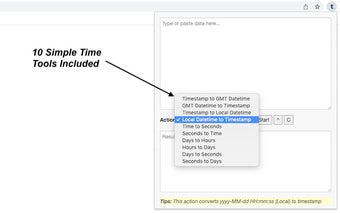
With Time Tools, users can easily convert timestamps to local or GMT date and time formats. The process is simple - just paste the timestamp and click on the start button. The extension quickly generates the desired result, making time manipulation tasks fast and effective.
The available tools include converting timestamps to GMT datetime format, GMT datetime to timestamp format, timestamps to local datetime format, and local datetime to timestamp format. Additionally, the extension offers tools for converting clock time in HH:mm:ss format to seconds, and vice versa. Users can also find out how many hours are in a given number of days, or how many days are in a given number of hours. Furthermore, the extension allows users to determine how many seconds are in a given number of days, or how many days are in a given number of seconds.
Time Tools is constantly evolving, with more tools being added to the extension on a regular basis. Users can expect updates and improvements to enhance their time manipulation experience.
Please note that the developer, Small Data Tools, does not provide any personal or contact information within the extension. Any feedback or suggestions should not be directed to the developer through the extension.